Category: Software Projects

Software Projects

  • Stock Portfolio Tracker: Java GUI & Spring Boot API

    Stock Portfolio Tracker: Java GUI & Spring Boot API

    Github repository for JAVA GUI: https://github.com/reazwrahman/stock-manager-gui

    Github repository for Spring Boot REST API: https://github.com/reazwrahman/stock-manager-api

    API is self-hosted at: https://stock-manager.reaz-projects.uk/usage

    A quick 2 minutes demo: https://youtu.be/sXTsvaIcSoE?si=GExVt1zk8LA-qmLY

    I built this stock portfolio tracker to solve a problem that has been on my mind for a long time – trying to see all my investments in one place. Like many casual investors, I had stocks scattered across Robinhood, Vanguard, and other platforms, making it tough to get a complete picture of each stock’s performance in comparison to others.


    My solution has two main parts: a Java desktop app with a simple GUI where I can manually enter my stock details, and a Spring Boot API that does the backend calculations. When I input a stock, the backend grabs real-time price data and calculates my returns. I added some features like an in-memory cache to avoid hammering external APIs and implemented multithreading to handle lots of stock requests simultaneously without slowing things down.

    I designed it with future expansion in mind: both components heavily use various creational, structural and behavioral design patterns. I am also planning to add a web UI later down the road that will easily integrate with the API.  

    GUI Screenshots:  


    Spring Boot API:

  • Fantasy Cricket Site (Full Stack)

    Fantasy Cricket Site (Full Stack)

    Live website hosted in AWS:  https://cmcc-fantasy-cricket.click/ 

    Github repository for UI written in Angular/TS: https://github.com/reazwrahman/fantasy_ui_angular

    Github repository for UI facing micro-service: https://github.com/reazwrahman/fantasy_contest_api_new

    Github repository for a backend micro-service (ETL): https://github.com/reazwrahman/Fantasy_Cricket_Backend_Lambda

    Building My Fantasy Cricket Website: A Journey from Monolithic to Serverless Architecture

    As a cricket enthusiast, I’ve always enjoyed playing fantasy cricket with my friends from high school. However, many of the fantasy cricket websites we used initially offered free services but eventually started charging for their features. Not wanting to pay just to enjoy a game we loved, I decided to take matters into my own hands and build a fantasy cricket website myself.

    The Initial Build: A Monolithic Application

    When I began this project, I didn’t know much about web development, but I was eager to learn. My first version of the site was a monolithic application, and I deployed it on the Heroku platform. Heroku was a great starting point because it allowed me to get my project online quickly. However, after a while, Heroku started charging me $5 a month. This led me to look for a more cost-effective solution, so I decided to migrate my website to AWS, where it now runs with minimal costs—only $0.50 a month for top-level CNAME redirection.

    Phase One: Running on AWS with Elastic Beanstalk

    The initial AWS deployment involved running my monolithic application on a single EC2 instance. I used AWS Elastic Beanstalk to manage the application, and an RDS MySQL database for storing all the data. While this setup worked, I noticed that the site had slow response times, which affected the user experience. Additionally, the cost of running EC2 and RDS instances 24/7 was higher than I wanted to pay, which prompted me to rethink my architecture.

    Phase Two: Transition to a Serverless Architecture

    To reduce costs and improve efficiency, I moved away from the EC2 instance and Elastic Beanstalk. Instead, I opted for a serverless architecture using AWS Lambda functions paired with a MySQL database. This setup allowed me to eliminate the need for always-on instances, theoretically reducing costs and improving scalability. However, I soon discovered that the Lambda-based architecture had performance issues, with response times significantly slower than those of the EC2-based setup. This led me to the next phase of re-architecting.

    Phase Three: Enhancing Performance with Micro-services

    Determined to improve the performance of my site, I further broke down the architecture into smaller components. I replaced the MySQL database with AWS DynamoDB, a NoSQL database known for its speed and scalability. This change, along with optimizing my use of Lambda functions, resulted in a significant improvement in response times. The current version of the website is now lightning fast, providing a much better user experience than before. Also, in this phase I decided to re-architect my source code: I broke down the monolithic application into two separate micro-services. This eliminated the need for real time computation with each user request and allowed me to run the heavy computation on a regular schedule with a different micro-service. This new architecture increased the performance of the website dramatically.

    Phase Four: Upgrading the Front-End

    While the back-end of the site is now optimized, the next focus was on improving the front-end. The legacy front-end was built using Python Flask, which had served me well for a prototype. However, to enhance the user experience and modernize the interface, redesigned the front-end using HTML, CSS, TypeScript, and Angular. The goal was to keep Flask as the back-end REST API while using Angular for a more responsive and interactive user interface.

    Conclusion

    This journey of building my fantasy cricket website has been a tremendous learning experience. From starting with a monolithic application to migrating to a serverless architecture and optimizing with DynamoDB, I’ve learned a lot about web development, cloud architecture, and performance optimization. I’m excited to continue enhancing the site, making it a top-notch platform for fantasy cricket enthusiasts like me and my friends.

  • DIY Thermostat (Full Stack)

    DIY Thermostat (Full Stack)

    Publicly available site:
    https://reazwrahman.github.io/thermostat_frontend/

    Hardware Setup for some perspective: https://reazwrahman.github.io/thermostat_frontend/background_pages/hardware_page/index.html   

    Github Repository for frontend component: https://github.com/reazwrahman/thermostat_frontend/tree/main 

    Github Repository for backend component: https://github.com/reazwrahman/Thermostat_Backend_API  

    Github Repository for simulation component: https://github.com/reazwrahman/SmartThermostat_Simulation 

    Project Description

    In my quest to create a comfortable living environment during the harsh New York winters, I embarked on a project to build a smart heater controller. The heating system in my old single-family house has always been unpredictable, swinging between unbearably hot during the day and freezing cold at night. Manually turning my electric heater on and off to maintain a comfortable temperature became a tedious routine, especially waking up in the middle of the night to adjust it. To solve this, I decided to automate the temperature control in my room using a blend of modern technology and custom-built components.

    Project Components: Frontend, Backend, and Two Modes of Operation

    My solution is composed of three key components: a frontend user interface, a backend API, and two distinct modes of operation—simulation and target.

    1. Frontend: User Interface Built with Modern Web Technologies

    To control and monitor the heater system, I built a user-friendly interface from scratch using HTML, CSS, JavaScript, and React. This frontend acts as the control panel for my smart heater, allowing me to set temperature preferences, switch between modes, and view real-time data. The frontend communicates directly with the backend API, sending commands and receiving updates to manage the heater effectively.

    2. Backend API: Python and Flask for Flexibility and Control

    The backend of the system is built using Python and the Flask framework, which provides a robust and flexible platform for handling the heater control logic. The backend API serves as the brain of the operation, processing inputs from the frontend and managing the heater’s state. It supports two different modes of operation:

    • Simulation Mode: In this mode, the system simulates the entire setup on a computer without needing physical hardware. I created virtual components, including a simulated temperature sensor and a power relay, to mimic real-world conditions. This mode generates logs and test data automatically during runtime, allowing me to validate and fine-tune the system’s behavior without risking actual hardware.
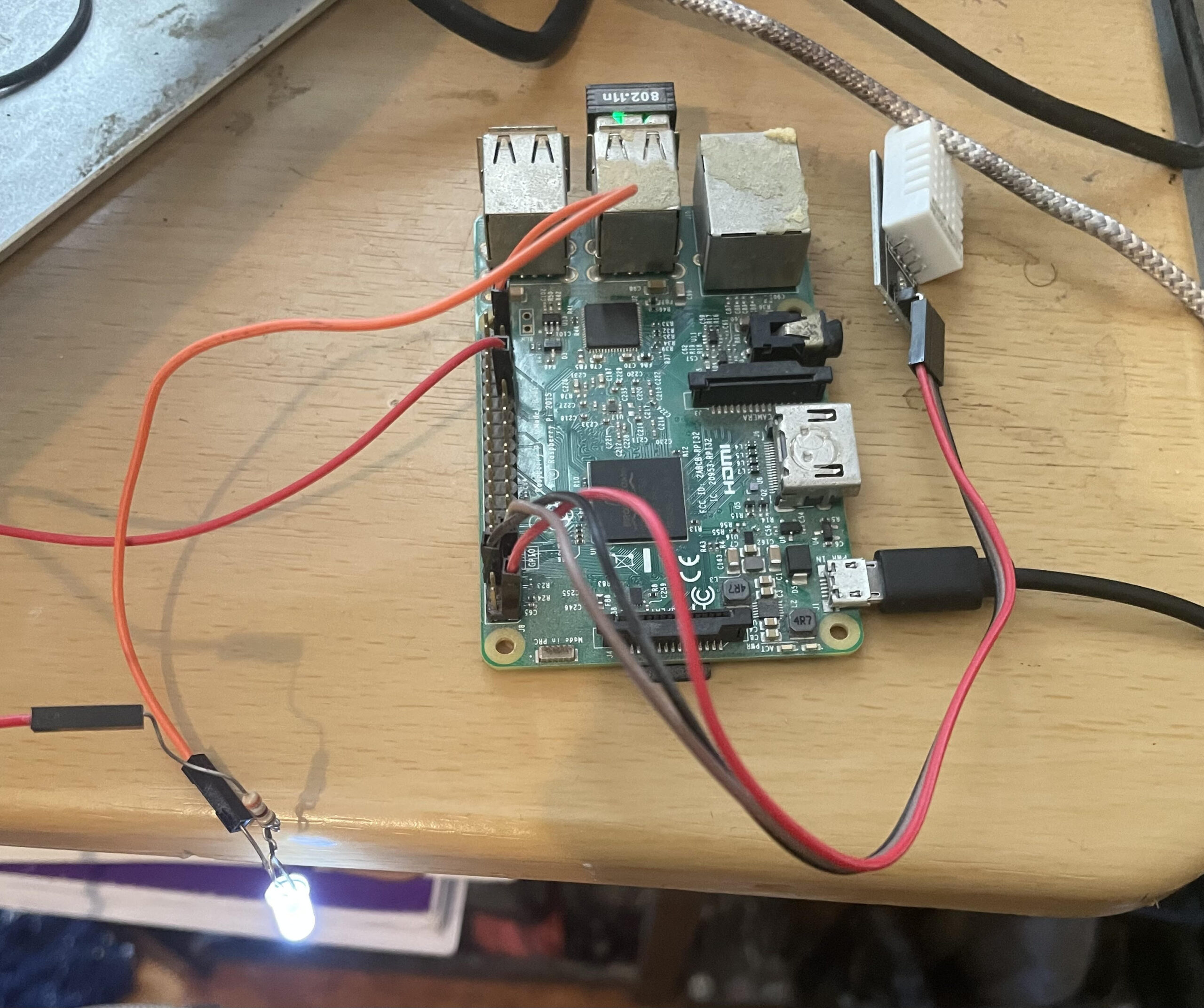
    • Target Mode: This is the production-ready setup where real hardware components are involved. In target mode, the system uses a Raspberry Pi microcontroller connected to an actual temperature sensor and a 120-volt power relay. These components control an electric heater or air conditioner, depending on the temperature requirements. The Raspberry Pi handles the processing and communicates with the backend API to ensure accurate temperature regulation in real-time.

    Conclusion: A Smarter, More Comfortable Living Space

    With these components, my smart heater controller project effectively automates the heating process in my room, adapting to changing temperatures throughout the day and night without requiring manual intervention. Whether running in simulation mode for testing or target mode for real-world application, this system provides a reliable and flexible solution to the challenges of living with an outdated heating system. By integrating modern web technologies with practical hardware solutions, I’ve created a comfortable and efficient living space that keeps me warm on even the coldest New York nights.


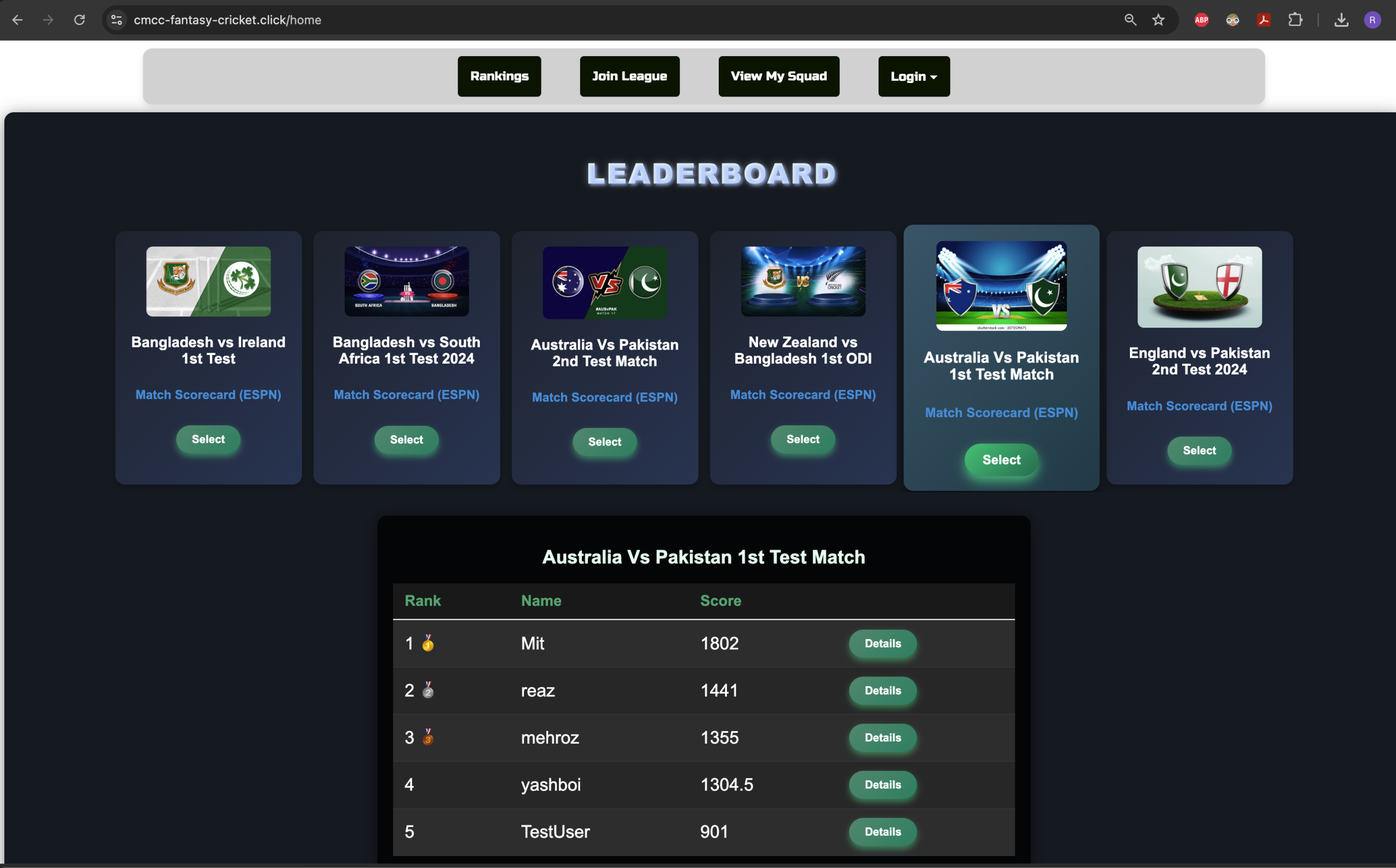
    A sample page from the website:

  • Machine Learning Prediction for Cricket Performance

    Machine Learning Prediction for Cricket Performance

    Project Scope

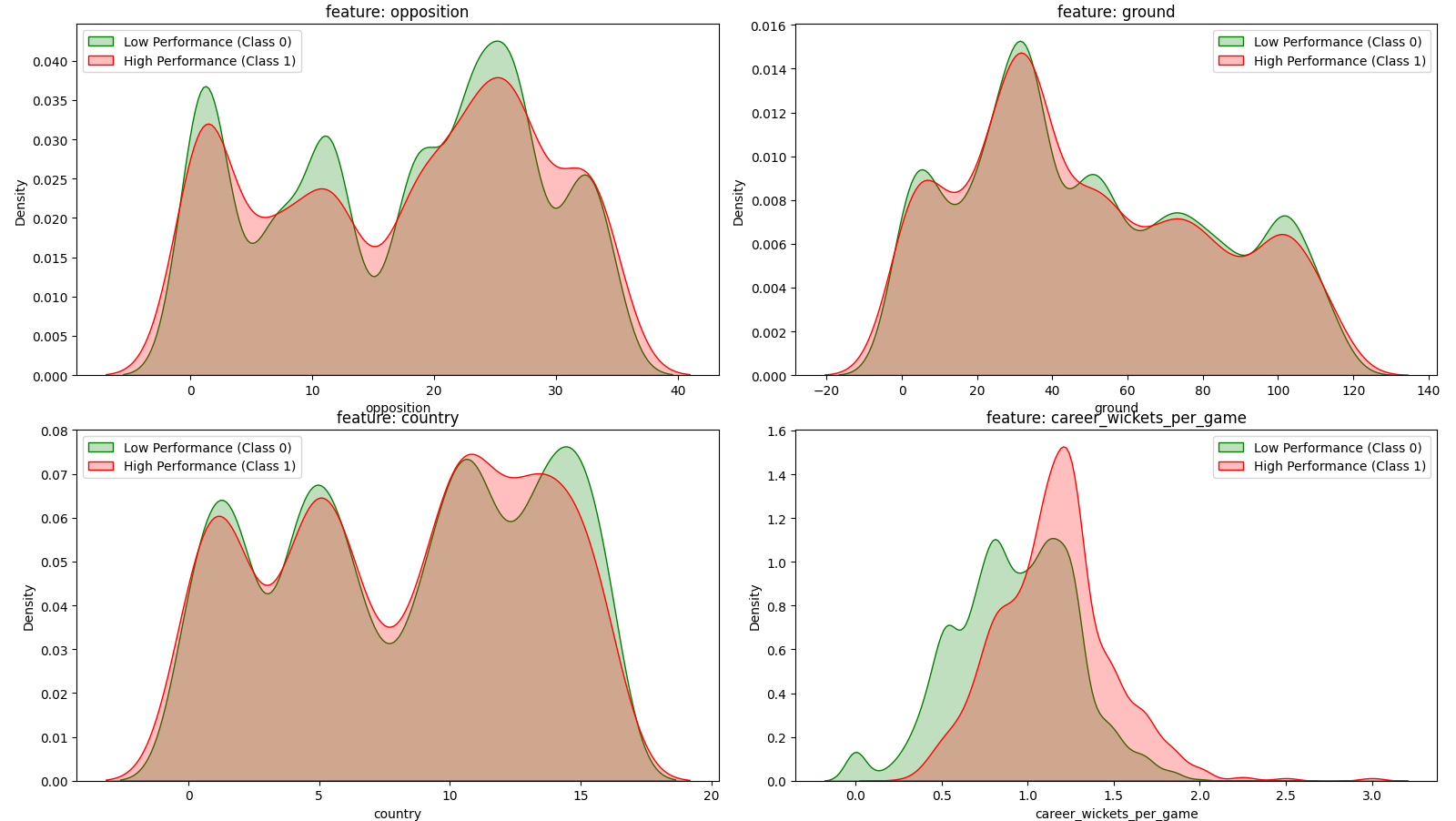
    This repository analyzes a number of machine learning models designed to predict whether a cricket player (batter and bowler) will exceed a specific performance threshold in upcoming matches. The project leverages open source historical data on players’ performances in each individual game and extracts the most relevant features including runs scored, strike rates, recent performance in the last ‘N’ games and match conditions, to train various classification models such as logistic regression, Random Forest, GBM, KNN and SVM.

    The analysis is focused around a) finding the right feature combinations for each classifier and b) coming up with a ranking system to compare the performance of the classifiers based on Accuracy, TPR and TNR.

    Github Repository: https://github.com/reazwrahman/ML-prediction-for-cricket/tree/main 

    Youtube Presentation Link: https://www.youtube.com/watch?v=IfC2IZdt6nU

    source data: https://data.world/cclayford/cricinfo-statsguru-data